Getting Started
Braille and Large Print
Requesting Ebooks
Requesting Items
Returning, Renewing, & Cloning Items
Tracking Requests
Who can use Resource Sharing?
UConn faculty, staff, currently enrolled students, and visiting scholars with an active Library account, UConn NetID, and UConn email address can utilize library services; those affiliated with UConn Health and UConn Law should use interlibrary loan services at their respective libraries.
Create your ILLiad account
The first time you request an item through ILLiad, you will be asked to complete your profile.
I teach at UConn. Can I share the resource I received from another library with my class?
No. These materials are for your personal use only, are not transferable, and may not be used for course reserves or distribution. For copyright and fair use guidelines, please see our Copyright page.
Is there a charge to use the service?
Our goal is to support academic research, learning, and professional development, so there is no cost to you. We ask for your discretion when placing requests, because requests do come with a cost to the University.
What else should I know about borrowing?
Please leave the bookband on your borrowed item so that we may identify it upon its return. We ask that you return your materials promptly, in the condition in which they were received. Please return or renew items by the due date.
What should I know about fines and fees?
You are responsible for your own materials and for managing your own account. If items are lost or damaged while in your possession, you will be billed through the Bursar’s Office for repair, replacement, or processing fees assessed by the lending library.
You will be sent a courtesy reminder before the item is due. If you do not return or renew your item before the due date you will receive an overdue notice. If you do not return your overdue item, you will receive a Notice of Fines and Fees. You will be charged for replacement (minimum of $95) as well as a nonrefundable $15.00 lost item processing fee. The replacement cost may be waived upon your returning the item; however, once an invoice has been paid to a lending institution, the replacement cost cannot be waived.
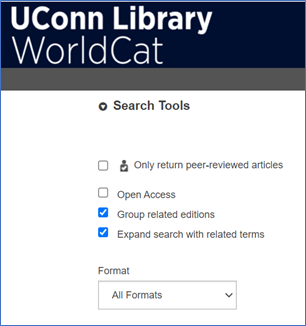
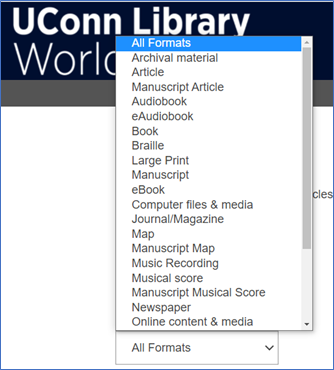
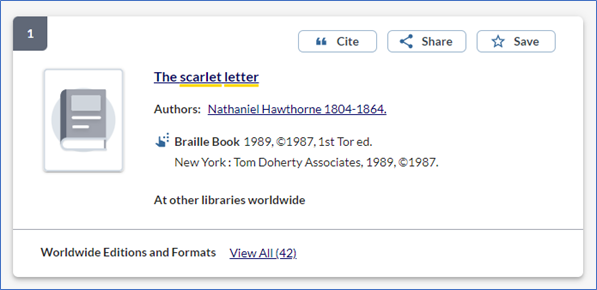
If you need a specific format, such as braille or large print, you can use the Format filter when searching WorldCat.
- Go to WorldCat
- Scroll to the bottom under Search Tools

- Select the Format dropdown menu

- Choose your needed format
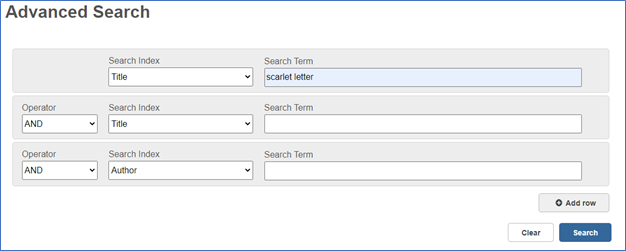
- Enter your search terms and perform your search

- Select your item

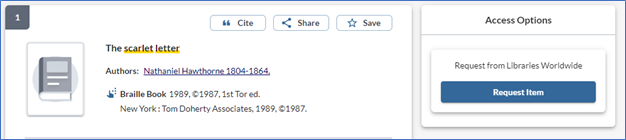
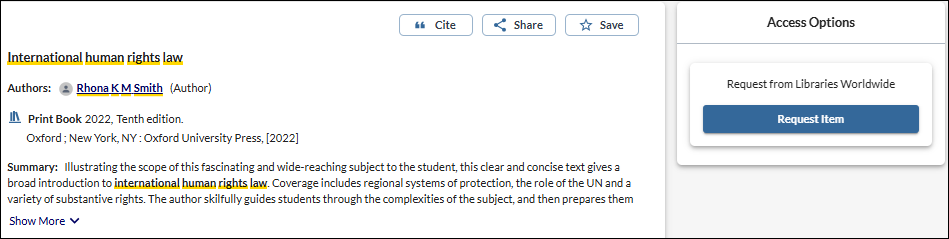
- Choose Request Item

How do I request an ebook?
Ebooks can be challenging for us to provide, due to licensing limitations. There are still only a small number of libraries that will loan their ebooks, but we will do our best to locate one. There are two ways you can request an ebook.
1. Request through WorldCat
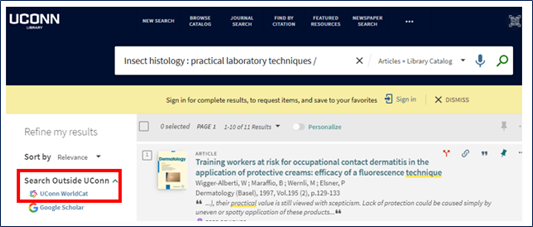
One way to request an ebook is to search the title in the catalog and then select the "UConn WorldCat" option under "Search Outside UConn" (or WorldCat direct: https://uconn.on.worldcat.org/advancedsearch).
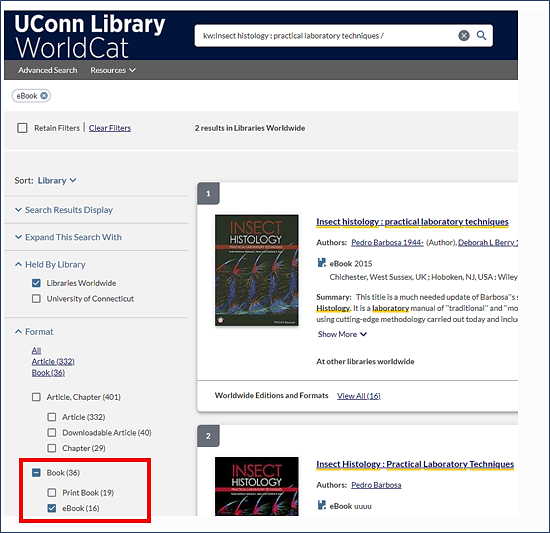
- Select "ebook" from the Format menu

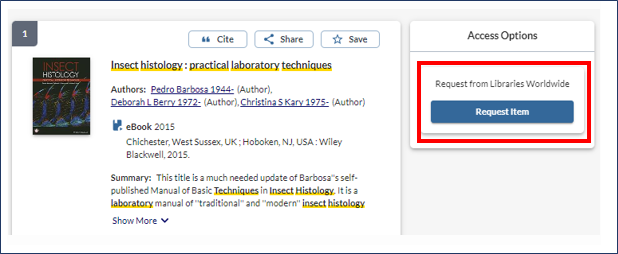
- Select the title and choose "Request Item"

- Sign in with your NetID and password when prompted
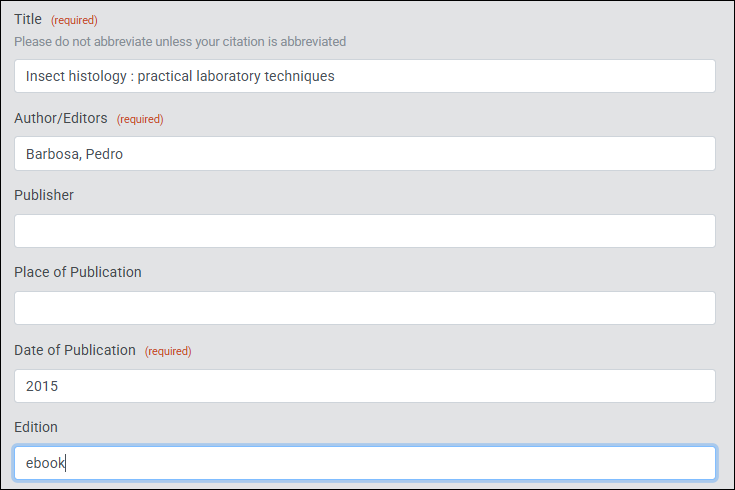
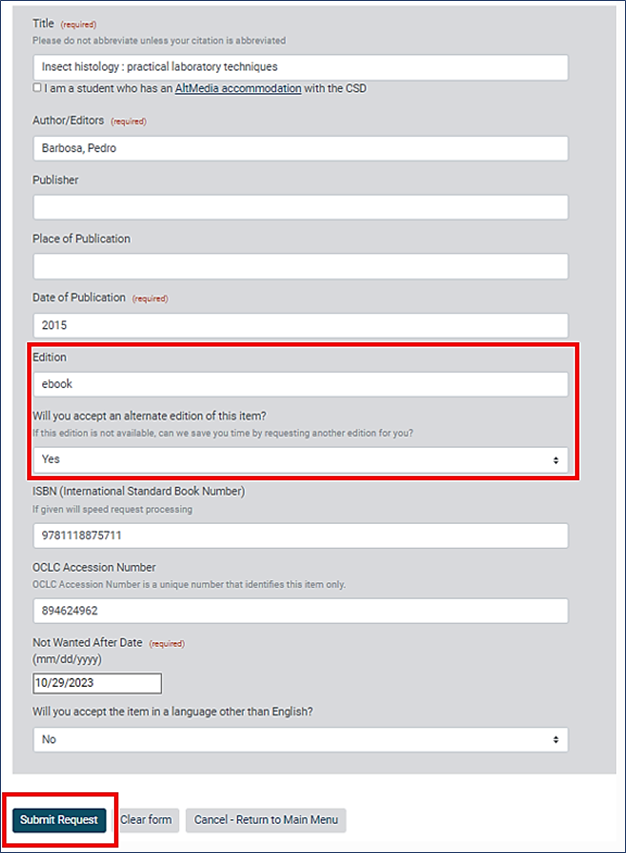
- A request form will appear, filled in with information about your book
- Enter "ebook" in the "Edition" box
- Choose "Submit Request"

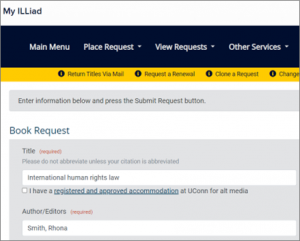
2. Request directly in ILLiad
- Sign in to your ILLiad account
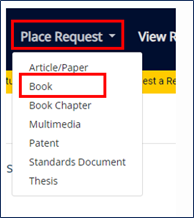
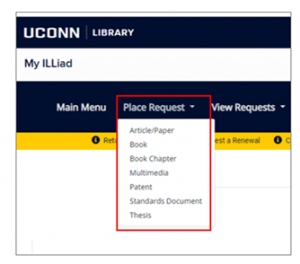
- Choose "Place Request" from the menu, and then "Book"

- Enter the book's information into the form
- Choose "Submit Request"

Can I request an ebook version of a book that UConn has in print?
Yes, you can request the ebook edition.
How will I receive my ebook?
Your ebook will come as a PDF. You will be notified via email when it is available.
Will I have to return my ebook?
No, the ebook will arrive as a PDF document that you will not need to return.
How do I request an article or chapter?
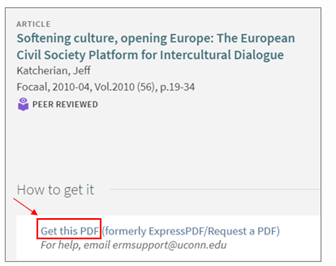
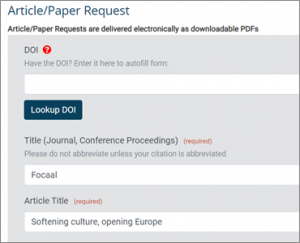
Search for and request your item in UConn WorldCat, our catalog, or our subject databases. Choose “Get this PDF.” Your form will appear populated with the citation information. You may notice that some required fields may not be filled in. Please fill them in to the best of your ability.
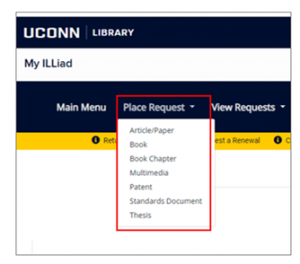
Alternatively, you may also enter the information manually into a blank ILLiad form. Log in to your ILLiad account, and under “Place Request,” choose your form from the list, such as “Article/Paper,” “Book Chapter,” or “Standards Document.” Please provide complete citation information to prevent any delays. Entering the DOI into the DOI field will populate the form for you. When complete, choose “Submit Request.” You will be notified when your PDF is available, and it will remain accessible for 30 days. Please place requests for chapters individually.
How can I borrow a book, DVD, VHS, CD, music score, or other material?
Search for and request your item in UConn WorldCat. WorldCat is a catalog of 1.5 billion items held at more than 15,000 libraries. Find the item you want and choose "Request Item" under "Request from Libraries Worldwide." Your form will appear populated with the citation information. You may notice that some required fields may not be filled in. Please fill them in to the best of your ability.
Alternatively, you may also enter the information manually into the “Book” or “Multimedia” forms in your ILLiad account. Log in to ILLiad, choose “Place Request,” and choose your form. Please provide complete citation information to prevent any delays. Entering the DOI will populate the form for you. When complete, choose “Submit Request.” You will be notified when your item is available.
Where can I pick up my item?
Items may be picked up at the Storrs campus at either the Babbidge Library, Music & Dramatic Arts Library, or Pharmacy Library, or at any of our regional campus libraries at Avery Point, Hartford, Stamford, or Waterbury.
How can I change my pickup location?
Please contact us at udoc@uconn.edu and we will change your pickup location for you.
How do I see my pending requests?
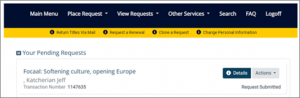
You can view your pending requests by logging into your ILLiad account
How will I know when my requested item is available?
You will receive an email notification to your UConn email address when your item is ready. Please do not contact lending libraries directly.
Can someone pick up my request for me?
Faculty and staff may allow students to check out materials on their behalf through registration as a Proxy Patron.
What kinds of things may I request?
Requests may be made for many kinds of resources, including print and e-books, articles, chapters, standards, proceedings, scores, DVDs, CDs, and more.
Is there a limit to how many things I can request?
There are no limits to requests; however, we reserve the right to limit how many we process per day. Large numbers of requests may be processed over several days.
Are there materials that aren't available through Interlibrary Services?
Materials that are generally not available through this service include: reference materials, unpublished manuscripts, rare, older, or fragile materials, entire issues or volumes of journals, educational kits, psychological tests, and genealogical materials. Some materials are difficult to obtain but we will do our best to find them.
What are the Interlibrary Loan usage Guidelines?
ILLiad materials are for your personal use only, are not transferable, and may not be used for course reserves or distribution. For copyright and fair use guidelines, please see our Copyright page.
Where do I return my materials?
On the Storrs campus you may return your materials to the Babbidge Library, the Music & Dramatic Arts Library, or the Pharmacy Library. Materials may also be returned to any of the four regional campus libraries: Avery Point, Hartford, Stamford, or Waterbury. More information on bookdrop locations is available in the UConn Library FAQ on bookdrop locations. Materials cannot be returned to the UConn Health Center Library or Law Library at this time.
Materials can also be mailed to us at the address below. We recommend you use a service that provides tracking, as you are responsible for your item until it is received back at our office.
Interlibrary Services
UConn Library
369 Fairfield Way, U-1005-F
Storrs, CT 06269
How do I renew or clone my materials?
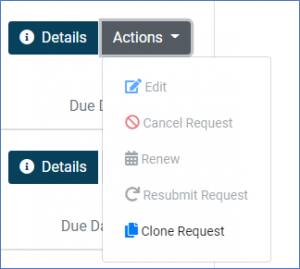
Renewals are at the discretion of the lending library. To request a renewal, log into your MyILLiad account and locate the item under ”View Requests.” Locate the item, choose “Actions,” and then “Renew.” If the institution does not allow for a renewal, or if you have already requested a renewal, you will not be given the option to renew, and it will be grayed out. If you still require the item, choose “Clone Request" to initiate a new request for the item. Please note that you still need to return the one you currently have.
What happens if I have overdue, lost, or damaged ILLiad materials?
You are responsible for the ILLiad materials that you receive. If items are lost or damaged while in your possession, you will be billed through the Bursar’s Office for repair, replacement, or processing fees assessed by the lending library. Once an invoice has been paid to the lending library, your fines cannot be waived.
How do I track my requests?
Log into your My ILLiad account Choose “View Requests,” then “All Requests” from the menu. If you have requested an item and it does not appear in your account, contact us with the item information.
How do I see my previous requests?
To help ensure your privacy, the system retains only a limited number of requests. To view your past requests, log into your My ILLiad account. Choose “View Requests,” then “Completed Requests” from the menu.
How do I cancel a request?
Please contact us with the item information including the title and the ILLiad transaction number (TN).